Simplifying ConnectSmart Mobility's Favorites Edit Experience

Redesigned the Favorites management experience for ConnectSmart Mobility, cutting the steps needed to manage a saved location from 4 down to 2, and giving users a more dynamic and customizable experience directly on the map.

Result

Designed in 2 weeks. The feature is live in the app. [App Store link]

Deliverable

Spec

Role

Lead Designer

Context

Q4 2025

Design, FE, PM

User Flow

Before: Favorite management is buried deep in the navigation hierarchy. User has to go through 4 steps before they can even access the option to edit a saved location. The interface also only displays text-based information, which provide little visual meaning for users and make it difficult to quickly recognize or distinguish saved places.


After: User can tap the saved icon on the map to edit their saved location. This also allows them to clearly view the icon they previously selected for that location.
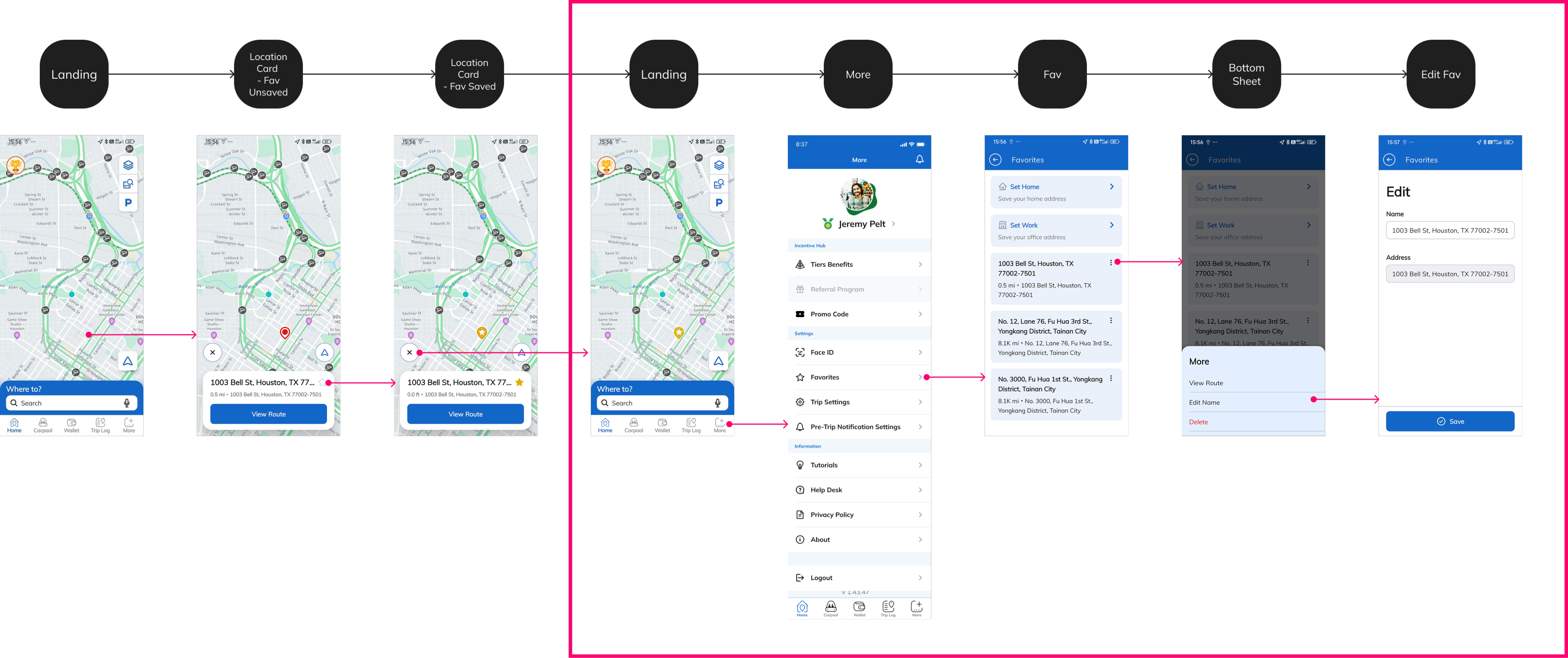
Before
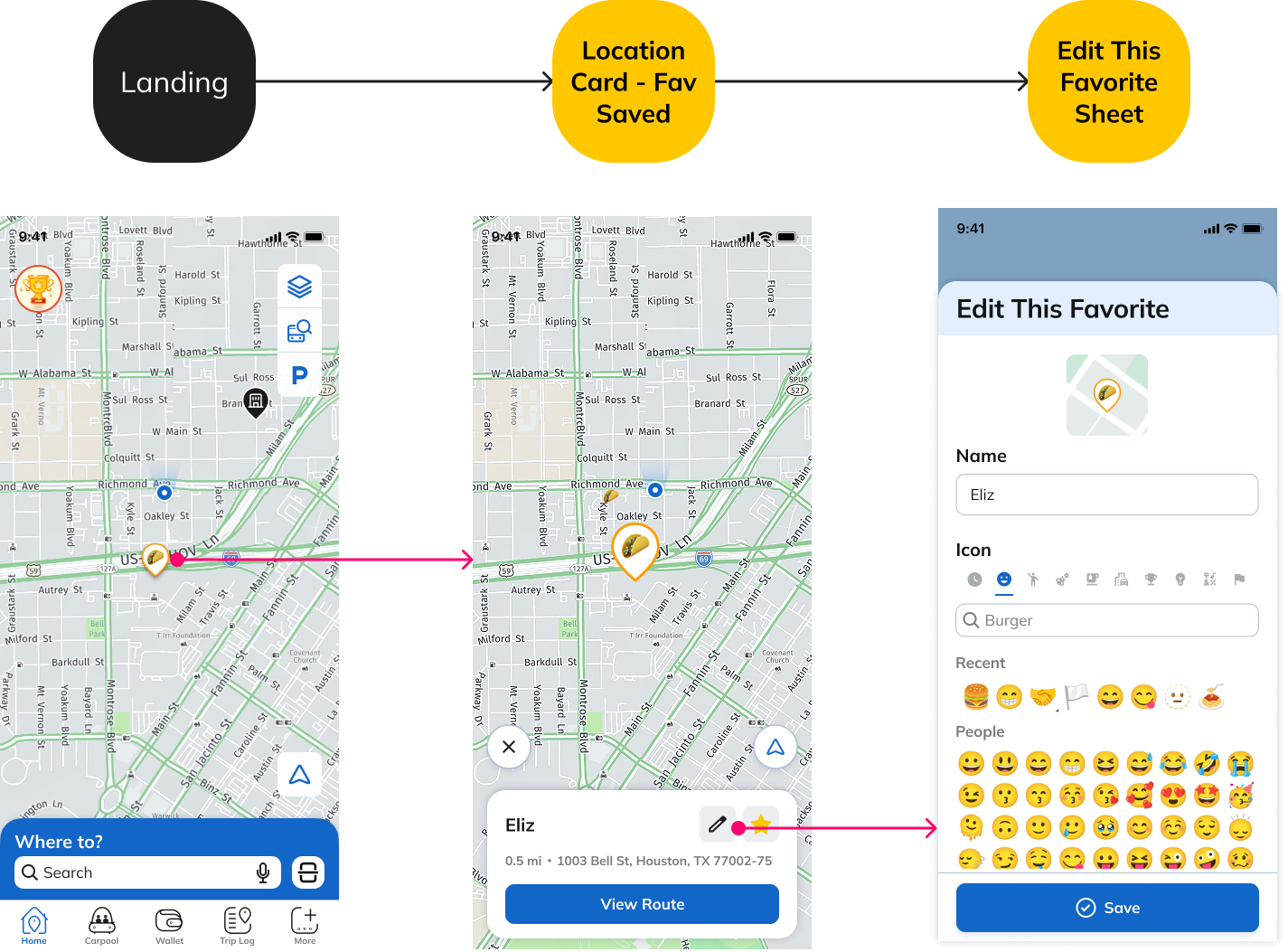
After

Interaction

Before: The saved icon appeared as the same generic star for every saved location, offering no way for users to personalize or visually distinguish their places. 


After: Users can personalize the icon for each saved location. When a location is selected, the icon briefly enlarges on the map, providing clear visual feedback and making it easier to identify which saved location is being selected.

Before

After

More projects

William design

Elevating iMarts’ Home Experience for Travellers

Redesigned the Favorites management experience for ConnectSmart Mobility, cutting the steps needed to manage a saved location from 4 down to 2, and giving users a more dynamic and customizable experience directly on the map.

Result

Designed in 2 weeks. The feature is live in the app. [App Store link]

Deliverable

Spec

Role

Lead Designer

Context

Q4 2025

Design, FE, PM

User Flow

Before: Favorite management is buried deep in the navigation hierarchy. User has to go through 4 steps before they can even access the option to edit a saved location. The interface also only displays text-based information, which provide little visual meaning for users and make it difficult to quickly recognize or distinguish saved places.


After: User can tap the saved icon on the map to edit their saved location. This also allows them to clearly view the icon they previously selected for that location.

Before

After

Interaction

Before: The saved icon appeared as the same generic star for every saved location, offering no way for users to personalize or visually distinguish their places. 


After: Users can personalize the icon for each saved location. When a location is selected, the icon briefly enlarges on the map, providing clear visual feedback and making it easier to identify which saved location is being selected.

Before

After

More projects

William design

Work

About

CV

Email me

Simplifying ConnectSmart Mobility's Favorites Edit Experience

Redesigned the Favorites management experience for ConnectSmart Mobility, cutting the steps needed to manage a saved location from 4 down to 2, and giving users a more dynamic and customizable experience directly on the map.

Result

Designed in 2 weeks. The feature is live in the app. [App Store link]

Deliverable

Spec

Role

Lead Designer

Context

Q4 2025

Design, FE, PM

User Flow

Before: Favorite management is buried deep in the navigation hierarchy. User has to go through 4 steps before they can even access the option to edit a saved location. The interface also only displays text-based information, which provide little visual meaning for users and make it difficult to quickly recognize or distinguish saved places.


After: User can tap the saved icon on the map to edit their saved location. This also allows them to clearly view the icon they previously selected for that location.

Before

After

Interaction

Before: The saved icon appeared as the same generic star for every saved location, offering no way for users to personalize or visually distinguish their places. 


After: Users can personalize the icon for each saved location. When a location is selected, the icon briefly enlarges on the map, providing clear visual feedback and making it easier to identify which saved location is being selected.

Before

After

More projects